

What makes SaaS customer support different?
SaaS customer support is the ongoing help customers receive before and throughout their software subscription, including pre-sales questions, onboarding, technical problems, account changes, billing and retention.
Unlike support for a one-time purchase, SaaS customer support continues for as long as someone subscribes, so each interaction can influence whether a customer activates, renews, expands or cancels.
The work is also unusually technical because support conversations may involve your API, documentation, product settings, subscription status and invoice history. A useful answer often depends on the customer’s actual account rather than a generic troubleshooting script.
For an early-stage SaaS company, the founders are frequently the support team, without tier-one agents or a dedicated contact center. The same people answering support tickets are also building features, fixing bugs and speaking with prospective customers.
That creates three recurring problems:
- Billing questions require real data. “Where is my invoice?” and “Why was I charged?” cannot always be answered from a FAQ.
- Tool switching consumes valuable capacity. Moving between an inbox, Stripe, documentation and a codebase turns a simple support request into a disruptive interruption.
- There is nowhere to escalate. The founding team must either solve the conversation or use support automation that gathers enough context for a clean handoff.
Good customer service reduces this friction for customers without creating another complicated support system for founders to manage.
Why SaaS customer support matters for retention
Every support conversation is a small renewal decision: fast, accurate help gives customers another reason to continue using the product, whereas slow responses, incomplete answers and repeated explanations create frustration that can compound into churn.
The commercial effect extends beyond ticket closure. Customers who consistently receive helpful support are more likely to complete onboarding, keep using the service, move to a suitable plan and recommend the software to others.
Research summarized by IBM reports that replacing the value of one lost customer can require winning roughly three new ones, based on research from McKinsey & Company. The same summary reports that 88% of customers consider good service as important as the product itself, reflecting findings associated with Salesforce.
Support should therefore be treated as part of the customer experience, not merely as a cost center. The right support process protects retention while showing the product team where customers encounter confusion.
Agent training and specialist team expertise
Effective SaaS support agents need more than polite scripts; they must understand the product, its terminology, common setup paths, account policies and the boundaries governing what they may change.
Create a practical support training system around four sources:
- Product documentation and help articles.
- Approved answers for billing, refunds and account access.
- Escalation rules for sensitive or unusual requests.
- Examples of resolved conversations that demonstrate the preferred tone.
Human agents should know when to investigate, when to escalate and when not to make assumptions. AI agents need comparable boundaries, with knowledge derived from current company material and sensitive actions remaining subject to explicit controls.
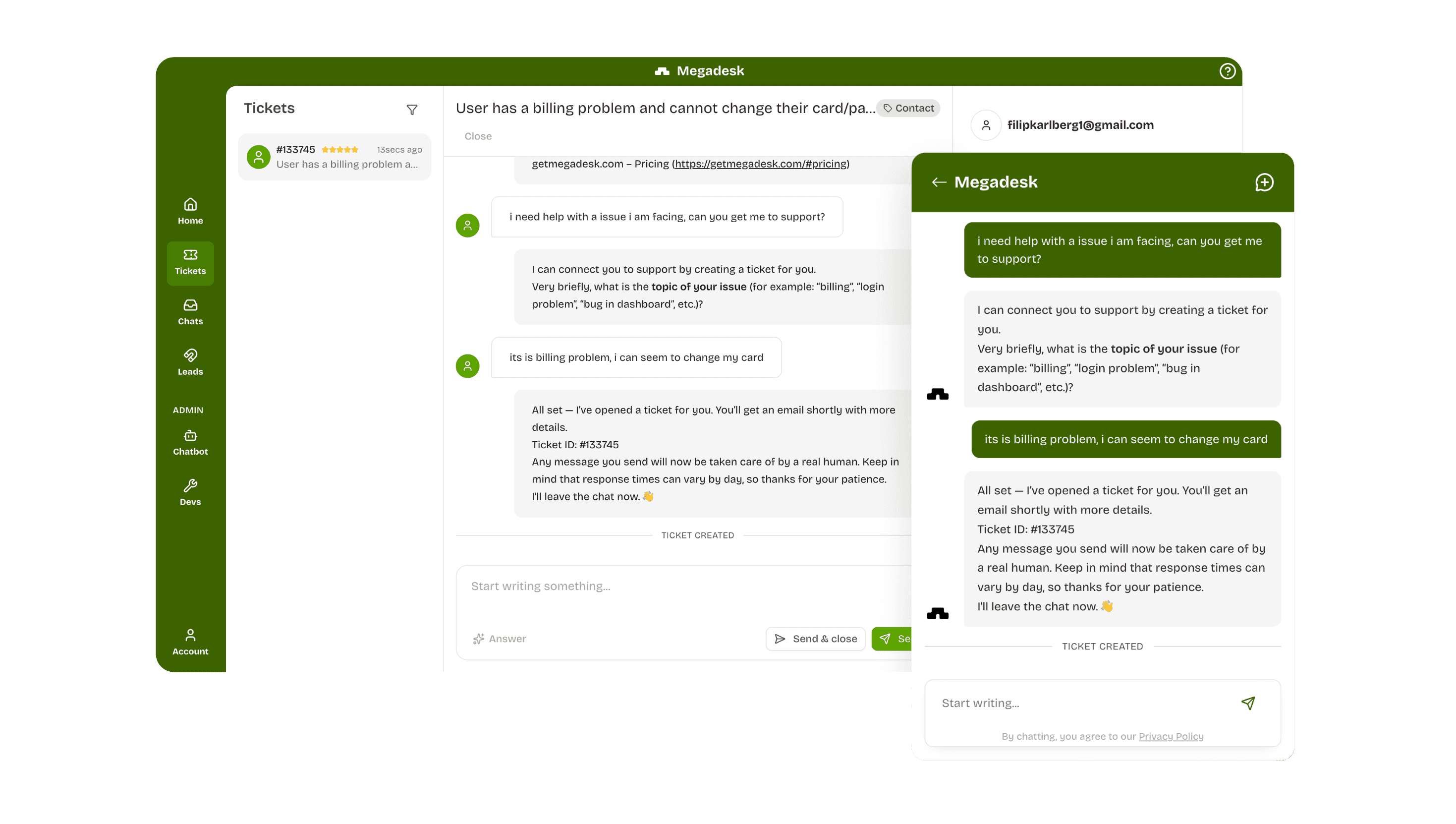
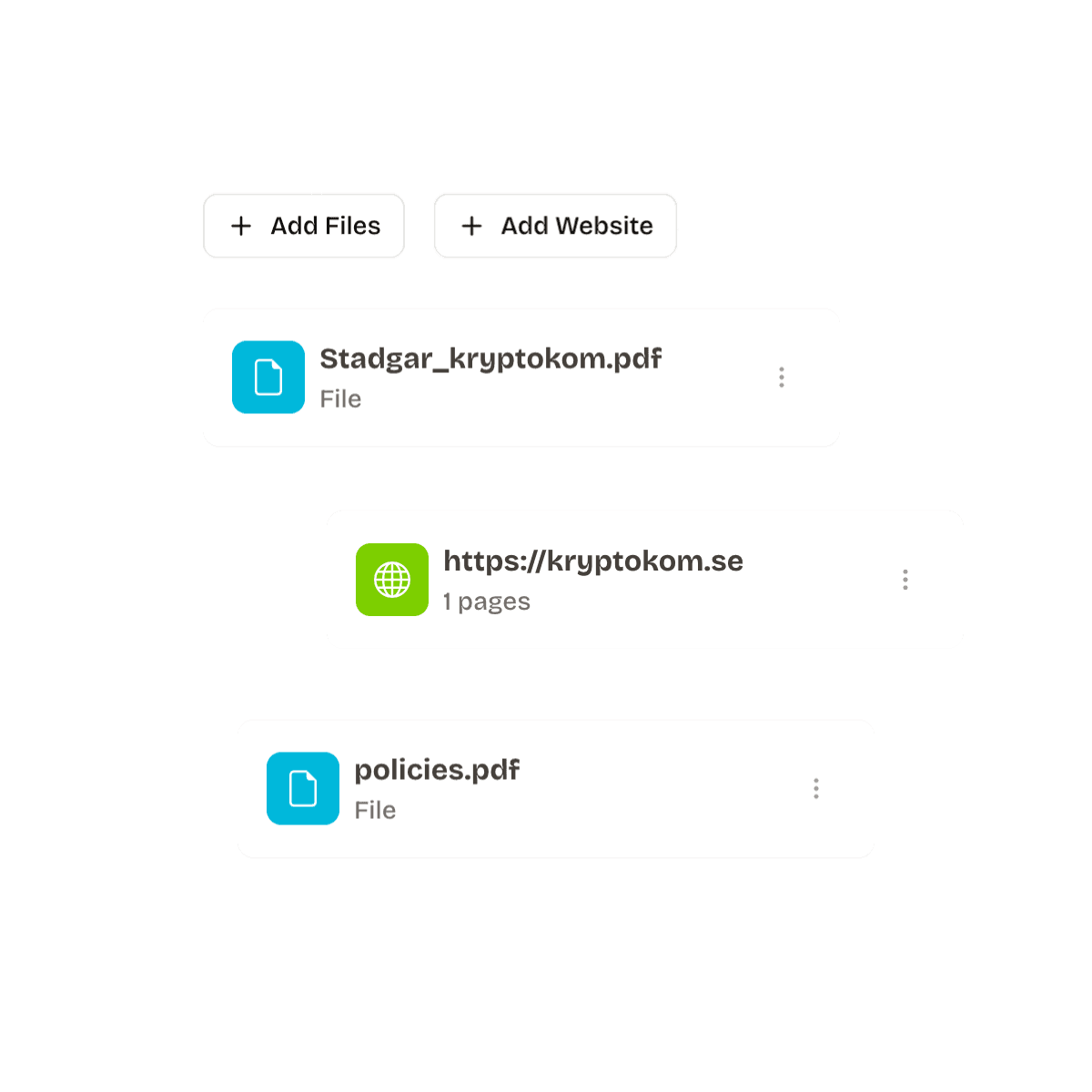
Megadesk can learn from your website content, documentation and uploaded PDFs, answering from that material in your tone rather than relying on a generic response library. When a support conversation requires judgment, an escalation template can collect the necessary details before the team takes over.
Common support challenges and practical solutions
Growing SaaS companies and their support teams often encounter the same operational obstacles:
| Challenge | Practical response |
|---|---|
| Repetitive setup questions | Improve onboarding content and train automation on it |
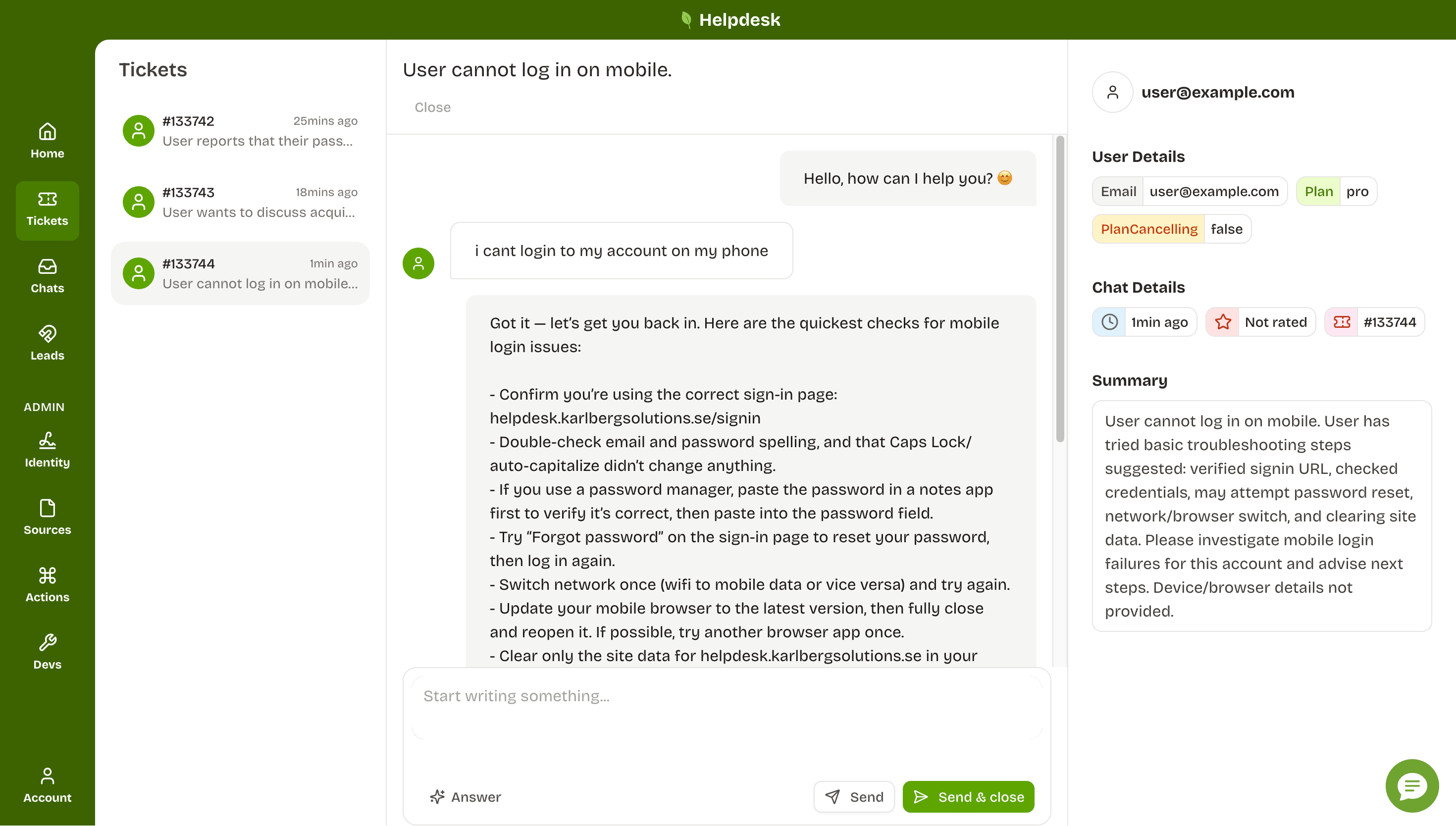
| Missing customer context | Attach the plan, contact and billing details to the conversation |
| Slow answers outside business hours | Use support automation for immediate answers and create complete handoffs |
| Inconsistent replies | Maintain approved policies and current documentation |
| Recurring tickets about one issue | Group topics and send the underlying problem to the product team |
| Risky automated actions | Require human approval for sensitive changes |
| Too many disconnected systems | Consolidate chat, messages and billing requests in one inbox |
The objective is not to automate every support interaction. It is to remove predictable work so people have greater capacity for edge cases, technical investigation and consequential retention decisions.
Channels and omnichannel support
Most SaaS companies do not need to launch on every possible channel. Live chat, messages and self-service resources cover much of the support demand for a small team, while phone, SMS and social support may become useful as the company grows.
The essential principle is continuity: customers should not have to repeat the same story because they moved from chat to another channel. An omnichannel approach works when conversations share history and context, not simply when several disconnected channels exist.
Which channels should SaaS companies offer?
Live chat inside the product gives customers immediate access to support at the point where they become stuck, making it useful for pre-sales questions, setup guidance and contextual assistance.
Ticketing remains important for account and billing issues. Forwarding a support address into a shared inbox helps teams preserve threads, coordinate ownership and avoid lost requests.
A self-service knowledge base lets customers find answers independently. The same material can ground AI support, allowing public documentation to assist both people and automated workflows.
Phone and social channels can be added when customer expectations, contract requirements or support volume justify them. Until then, dependable chat and messaging-based customer service may be more valuable than a telephone number that is rarely staffed.
Megadesk combines conversations and billing requests in one AI-powered inbox. Its embeddable widget is under 12KB, supports files and images, and is designed not to harm page speed or Core Web Vitals.
Support tools, CRM integrations and customer context
A support tool should reduce investigation rather than become another place to search. At minimum, support agents need a clear conversation history and the customer details required to understand each request.
For SaaS customer support, useful context may include:
- Customer contact information
- Current plan
- Subscription status
- Monthly recurring revenue
- Relevant invoice history
- Previous conversations
- Product or account details needed for diagnosis
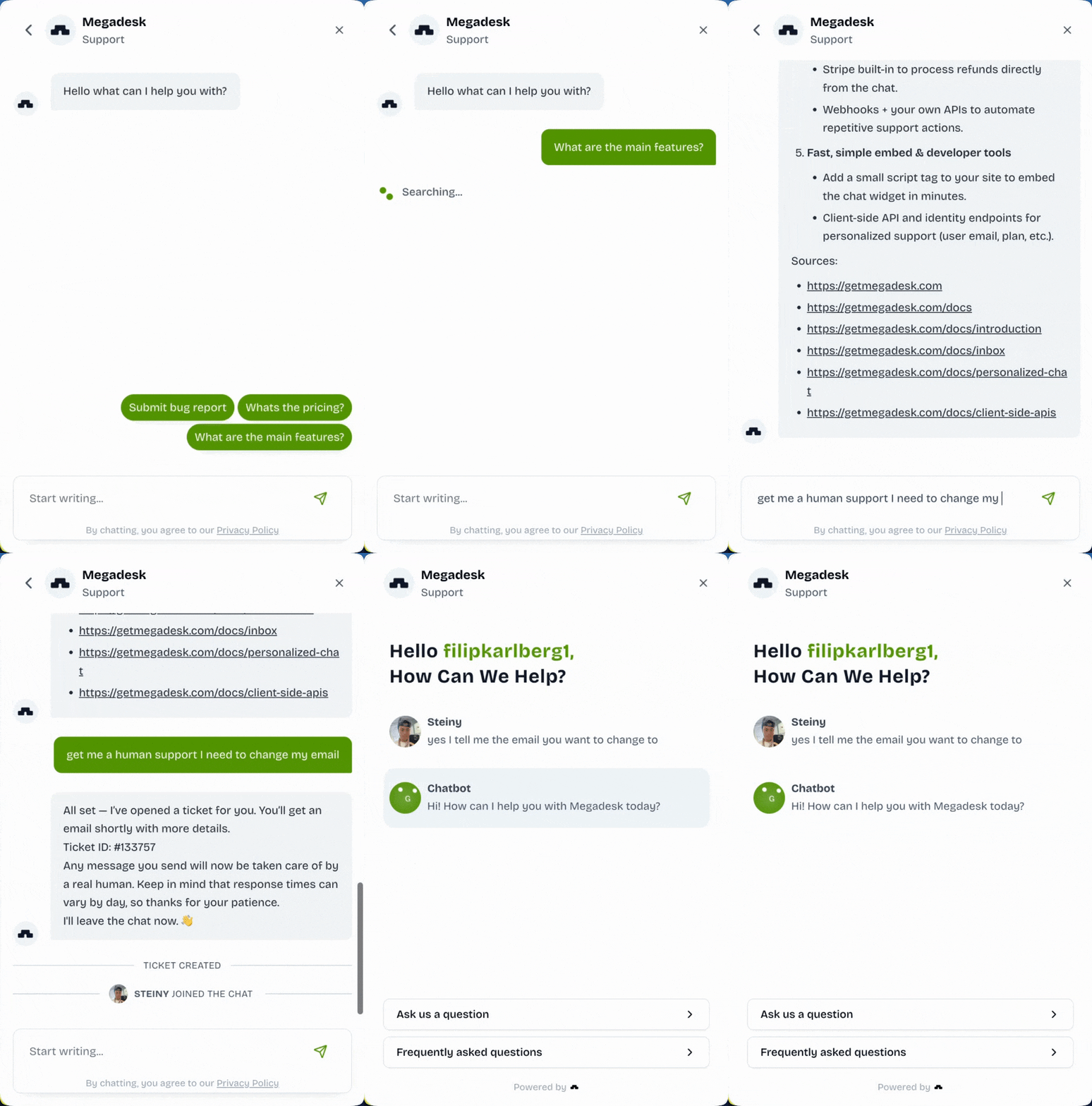
Megadesk includes contact, plan and Stripe billing information with each ticket, together with a quick summary that helps the support team understand the situation without asking the customer to repeat basic details.
When assessing CRM integrations or other systems, consider whether data appears inside the workflow where it is needed. An integration that still requires constant tab switching may not produce meaningful efficiency.
Custom API actions can go further by connecting Megadesk to your backend for account lookups, password resets or plan changes. You define what the automation can do, and sensitive actions can enter an approval queue before execution.
For implementation details concerning billing systems, consult the official Stripe documentation.
AI and workflow automation
In 2026, AI is increasingly the first line of SaaS customer support. According to Intercom’s 2026 Customer Service Transformation Report, 82% of senior support leaders invested in AI during the previous twelve months, while 87% of teams with mature deployments reported better support metrics.
Useful support automation can:
- Answer common questions from approved documentation.
- Draft replies using the ticket and customer context.
- Collect technical details before escalation.
- Look up account information through an API.
- Route sensitive actions to a human approval queue.
- Provide immediate support coverage during nights and weekends.
- Identify knowledge gaps through repeated escalations.
On Megadesk’s own SaaS, Transfer.zip, the AI system removed 80% of support workload within three months. That result is specific to the company’s experience, but it illustrates how automation can transform the responsibilities of lean teams.
Automation should remain transparent and controlled. The safest model grants authority over routine, reversible tasks while reserving refunds, unusual account changes and nuanced retention cases for human review.
Self-service and onboarding
A useful knowledge base should answer the questions customers ask while trying to achieve their first successful outcome. Begin with setup steps, integrations, account access, billing and the most frequent how-to requests.
Keep each support article focused on one task, using clear headings, screenshots and exact interface labels. Review content whenever the product changes because outdated self-service guidance can generate more support tickets than it prevents.
Megadesk can use website pages, documentation and PDFs as its knowledge source. Suggested replies beneath the chat greeting also give new customers a straightforward way to begin a support conversation.
This makes documentation part of the onboarding experience. A customer who asks “How do I connect X?” can receive an immediate answer at the moment they are deciding whether the product works for them.
Proactive customer service and 24/7 response time
The most effective support interaction can occur before a conventional ticket exists. Proactive help can clarify a confusing form, explain pricing or assist someone who has reached a cancellation page.
Megadesk nudges let a team attach a helpful popup to an element on its website, and that popup can open chat with a pre-filled customer message. If someone asks to cancel, the system can also offer a retention discount that the company configured before cancellation proceeds.
This support approach addresses the reason behind the request rather than merely recording it. It may also expose usability problems that should be corrected within the product.
Two-thirds of consumers expect a ticket to be resolved within three hours, according to HubSpot research. Continuous human coverage is unrealistic for many founders, but AI can answer documented questions around the clock.
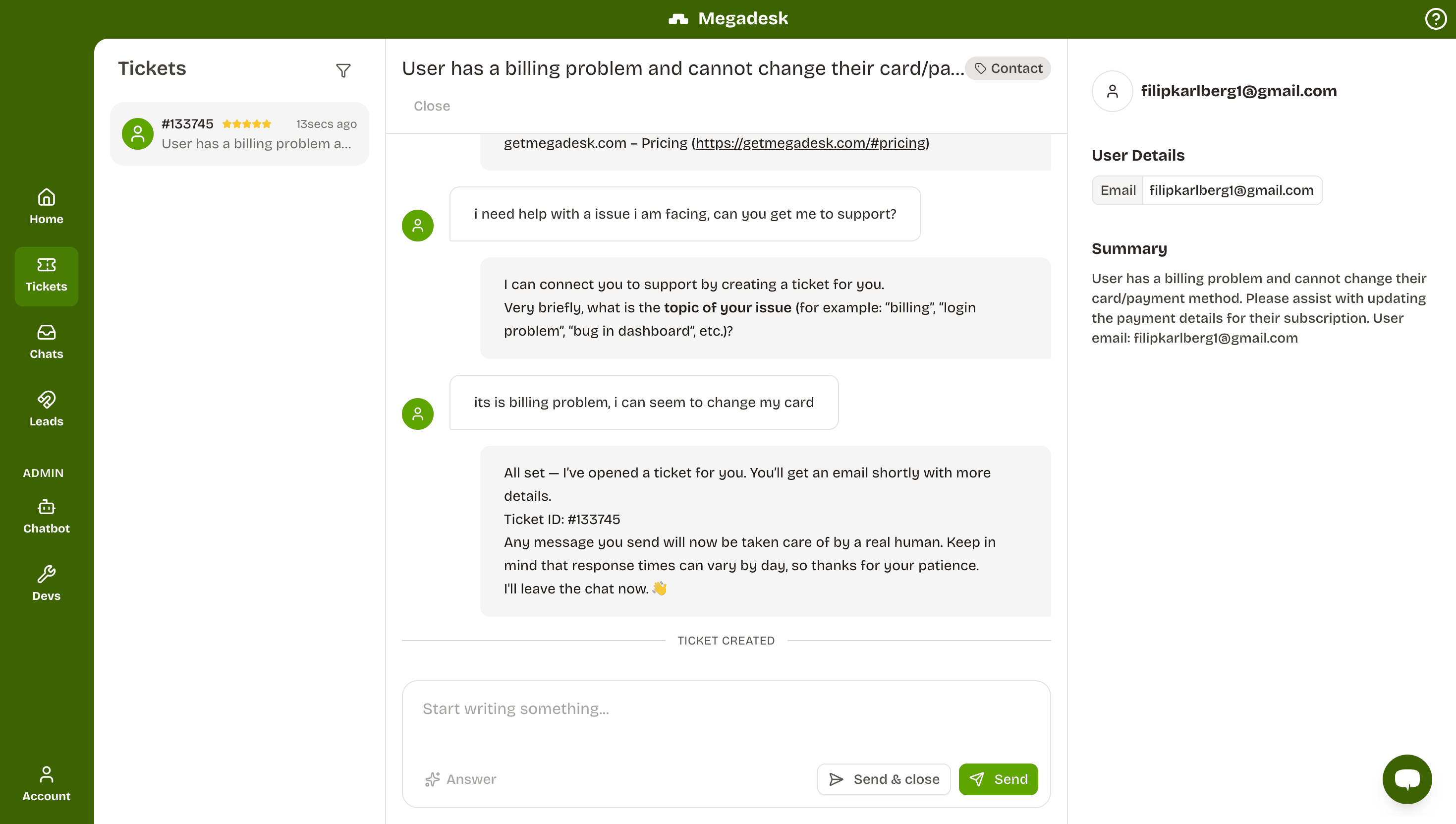
If a person must take over, automation collects the required information and opens a ticket. The customer receives a message containing a link where the conversation can continue, allowing the founder to reply when available without leaving the customer in an unexplained dead end.
SaaS customer support metrics, satisfaction and scale
Support performance should connect operational speed with customer outcomes. A small company does not need an analytics department, but its support team should review a consistent set of indicators every week.
Metrics are most valuable when they lead to action: a slow first response may require better routing, a high escalation rate can reveal missing documentation, and repeated tickets may expose a product problem rather than a staffing issue.
Metrics and KPIs that show success
First-response and resolution time
First-response time measures how long a customer waits to hear back and is often the most visible operational measure from the customer’s perspective.
Resolution duration tracks the period between the first message and a complete solution. Account and billing context can shorten this interval by eliminating avoidable questions such as “Which plan are you using?”
Megadesk analytics display average response duration for tickets, while conversations answered through AI receive their first response in seconds.
CSAT, deflection and escalation rate
Customer satisfaction score, or CSAT, records the customer’s direct rating of an interaction. Megadesk asks people to rate their chat and tracks the average result across reporting periods; for background on the methodology, see this overview of customer satisfaction.
AI deflection is the proportion of conversations resolved without human work. Megadesk reports this measurement as Automation %.
Escalation frequency measures how often a conversation is handed to a person. A sudden increase can indicate that the support automation lacks a necessary answer, and updating the knowledge base may reverse the pattern.
Recurring topics, retention and churn
Track reopened tickets and repeated topics. If the same issue appears across many conversations, the company may need to fix a workflow, clarify onboarding or change the product itself.
Retention and customer churn are the ultimate business outcomes, although they usually live in billing data rather than the helpdesk. On Transfer.zip, monthly churn fell from 20% to 12% after support moved to Megadesk.
That first-hand result belongs to Megadesk’s own product and should not be treated as a guaranteed outcome for every company. It does demonstrate why support data and subscription data should be reviewed together.
Scaling SaaS customer support as companies grow
Scaling does not simply mean hiring more agents whenever ticket volume rises. A more sustainable sequence is:
- Document the most common support answers.
- Improve customer onboarding where customers repeatedly become stuck.
- Consolidate conversations and customer context.
- Automate predictable questions and safe actions.
- Create clear escalation procedures.
- Use recurring topics to improve the product.
- Add specialist staff or channels where demand remains.
This sequence prevents every new customer from generating the same amount of manual support work, while helping teams preserve a consistent experience as volume increases.
Support specialists become especially useful when conversations require deep expertise, contractual response commitments, additional languages or extended coverage. Before adding headcount, establish quality standards and a clear source of truth so new support agents can learn efficiently.
Best practices for a growing support center
A scalable support center should follow several durable principles:
- Answer from current product information rather than memory.
- Keep all support channels connected to the same customer history.
- Make ownership and escalation rules explicit.
- Give support agents the context needed to act.
- Require approval for sensitive automated actions.
- Review core metrics every week.
- Turn repeated conversations into documentation or product improvements.
- Treat onboarding and proactive help as part of support.
- Preserve access to a human for complex or high-risk situations.
- Audit AI answers and permissions as the service changes.
These practices improve customer service without assuming that every company needs a large department or multiple external services.
Outsourcing and choosing technical SaaS support providers
Outsourcing can be appropriate when internal support coverage no longer matches customer demand. External services may help with overnight availability, additional languages, seasonal volume or a clearly defined tier of repetitive requests.
However, SaaS support is difficult to outsource without preparation because a provider cannot deliver accurate answers when product documentation, escalation paths and permissions remain unclear.
Before outsourcing, define the work that an external team may perform. Specify which requests require internal specialists, which account actions are permitted and how support performance will be measured.
When outsourcing makes sense
Consider an outside support provider when:
- Ticket volume consistently interrupts product development.
- Customers need coverage across multiple regions.
- Service commitments require faster responses.
- The company needs language capabilities it does not have internally.
- Support processes are documented well enough for another team to follow.
- There is a reliable method for escalating technical and billing issues.
Do not outsource solely to avoid understanding customers. Early support conversations contain valuable product feedback, and founders should retain direct visibility into recurring problems.
How to choose the best provider for SaaS companies
The best provider is the one that fits the product’s complexity, customer expectations and existing workflow. Evaluate candidates against practical requirements rather than selecting solely on headline cost.
Ask whether the provider:
- Has experience with subscription software and technical troubleshooting.
- Can learn your documentation and product terminology.
- Supports the channels your customers use.
- Integrates with your inbox, billing data and other essential systems.
- Offers the hours and languages you require.
- Has clear security and access controls.
- Measures response speed, resolution speed, CSAT and escalations.
- Provides quality reviews and documented handoffs.
- Can scale without changing the customer experience.
- Lets your internal team retain visibility into every conversation.
Review SaaS support platform comparisons before deciding between software, additional employees and outsourced support services.
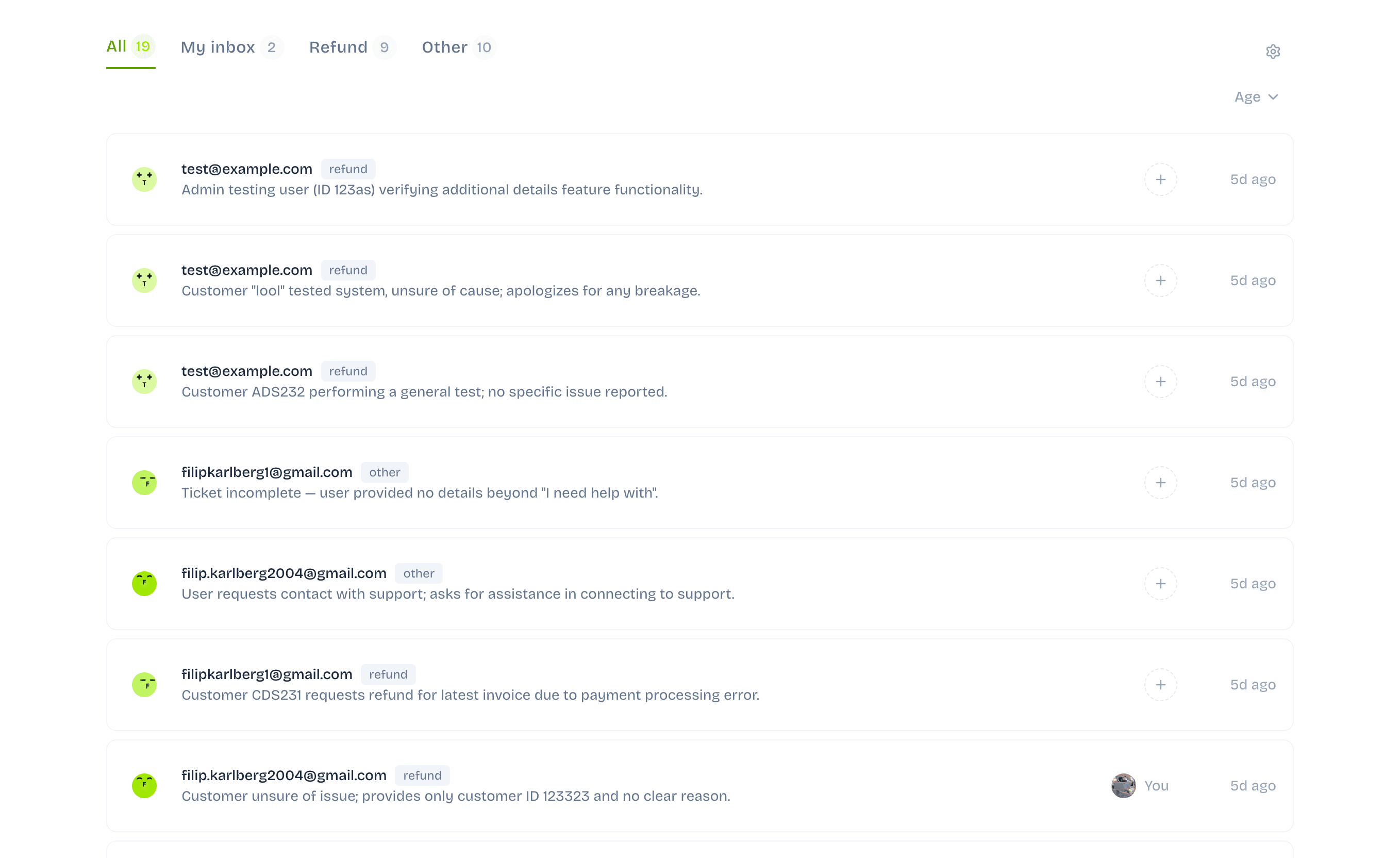
Megadesk is a helpdesk rather than an outsourced staffing provider. It is built for founders who want chat, messaging, AI automation, customer context and Stripe actions in one place while retaining control of sensitive decisions.
Start a 14-day free trial with no credit card required. You can cancel at any point.